
This fly. It was killing me. For hours it was circling around me while I was sitting at my desk. And everytime I leaned back, it landed either on my MacBook, my iPhone or on my iPad. I watched this for several hours until it dawned on me: if this fly finds my iDevices so delicious, there must be something wrong.
Continue reading
Hacker News Aftermath
After I submitted my review of Hacker News iPad Apps to Hacker News, it shortly made it to the frontpage, with the result that the thundering horde quickly exhausted the tiny traffic quota I had at my hoster. I’ve decided to migrate to another hoster and if you read this, the DNS change has reached your corner of the Intertubes.
If you notice broken links or anything else that is flaky, please let me know on Twitter (@danielhepper) or drop me a mail at daniel [at] hepper [dot] net. Thanks!
A review of all available Hacker News iPad Apps
Browsing Hacker News on the iPad is okay, but far from perfect. As of this writing, there are five Hacker News iPad Apps available on the App Store that promise a more comfortable experience:
I took the time (and money) to try them all, this are my findings.
Continue reading
How to make a Pac-Man ghost lamp
In this post, I will show you how to make a Pac-Man ghost lamp. You can also find it on Instructables.
To be precise, we will create small ghost lamp shades to turn a boring spotlight system into a great looking Pac-Man themed lamp.
You will need:
- plastic bottles with the right shape
- a lamp, preferably a halogen spotlight system
- some white and black plastic
- spray paint in red, pink, cyan and orange
Once you found the right bottles and a nice lamp, this project will take about 2 x 2 hours.
Continue reading
Fixing a messed up Vagrant installation
I’m currently struggling with what seems like a bug in Virtualbox that affects the new Core i7 MacBooks. While trying to fix it by building Virtualbox from source, uninstalling and reinstalling, I managed to mess up a box managed with Vagrant, rendering it inaccessible.
If you find yourself in a similar situation, you can try to fix it with the VBoxManage command.
$ VBoxManage list vms
"
$ VBoxManage unregistervm {b68ed7a7-6e72-4f16-a438-8775cd80d9b3} --delete
VBoxManage: error: The object is not ready
VBoxManage: error: Details: code E_ACCESSDENIED (0x80070005), component Machine, interface IMachine, callee nsISupports
Context: "Delete(ComSafeArrayAsInParam(aMedia), pProgress.asOutParam())" at line 175 of file VBoxManageMisc.cpp
Segmentation fault
As you can see, it died with a segmentation fault, but the broken box was now gone and I could restart it with vagrant up.
Continue reading
Change order of PATH entries on Mac OS X
I wanted to have /usr/local/bin to be listed before /usr/bin in my PATH environment variable.
One way to achieve this would be to add a ~/.profile file with a line like this:
export PATH=/usr/local/bin:$PATH
This would result in /usr/local/bin being listed twice. It wouldn’t hurt but it’s not pretty either.
If you look at /etc/profile, you will see that the initial value of PATH is set by path_helper(8).
The right way to change the order of default paths is to edit /etc/paths. It contains one path per line, in descending order. Mine looks like this:
/usr/local/bin

/usr/bin

/bin

/usr/sbin

/sbin
Using Python Packages – An Overview
Yesterday I gave a presentation at PyCologne about Python packages. It was meant as a kind of sequel to the “Cooking Eggs” talk given by Christopher Arndt (in German) in September. While he presented ways to create Python packages, I focused on how to use Python packages.
Python comes with batteries included, but sometimes, battery power is not enough. Thankfully, there are countless packages available for use. Given that there “should be one– and preferably only one –obvious way to do it,” using Python packages can be quite intimidating. The documentation of your package might say to download, unzip und run python setup.py install. Meet distutils. Or just do easy_install MyPackage, which is uses setuptools. But then you hear that setuptools is superseeded by distribute and instead of easy_install, you should use pip. And then there is virtualenv, which is awesome, but can be even more awesome with virtualenvwrapper. What a mess!
My conclusion: use distribute, pip, virtualenv and virtualenvwrapper.
You can download the slides or view them with Slideshare:
Using Python Packages – An Overview
View more presentations from danielhepper.
Verify AWS free tier
Starting from November 1st, Amazon offers a free usage tier for new AWS customers. After finishing the horrible signup process, I was left wondering wether the free usage tier was activated for my account.
To find out, just start an EC2 micro instance*. Don’t forget to stop it. After some time, go to the account activity page and click on “expand all services”. You should see something like this:
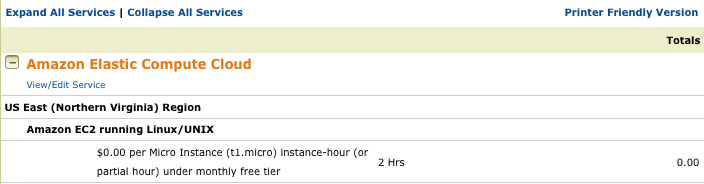
* This will cost you a few cents if you don’t have a free usage tier.
How to fix VariableDoesNotExist exception in Django
When Django greets you with this exception:
TemplateSyntaxError at /
Caught VariableDoesNotExist while rendering: Failed lookup for key [request] in...
you are probably using a template tag that requires the request context processor. Simply add ‘django.core.context_processors.request’ to the TEMPLATE_CONTEXT_PROCESSORS tuple in your settings file.
Howto clear Solr index
If you want to delete all items from Solr index, use the query
<delete><query>*:*</query></delete>
as described in the FAQ on the Solr Wiki.
But how do you actually send this query? You can use this command:
curl http://<host>:<port>/<solr_base>/update?commit=true -d '<delete><query>*:*</query></delete>'
Just replace the placeholders with the right values, e.g.
curl http://localhost:8983/solr/update?commit=true -d '<delete><query>*:*</query></delete>'
If Solr responds with something like this:
HTTP Status 400 - missing content stream
Status report
message missing content stream
description The request sent by the client was syntactically incorrect (missing content stream).
then you are probably missing the commit parameter i.e. ?commit=true